How to set delivery prices for physical products
Welcome! This guide will help you set up delivery prices for your physical products.
Important Note
Selar does not handle delivery for merchants, but we can help you charge customers for delivery to specific locations.
Steps to Set Up Delivery Prices
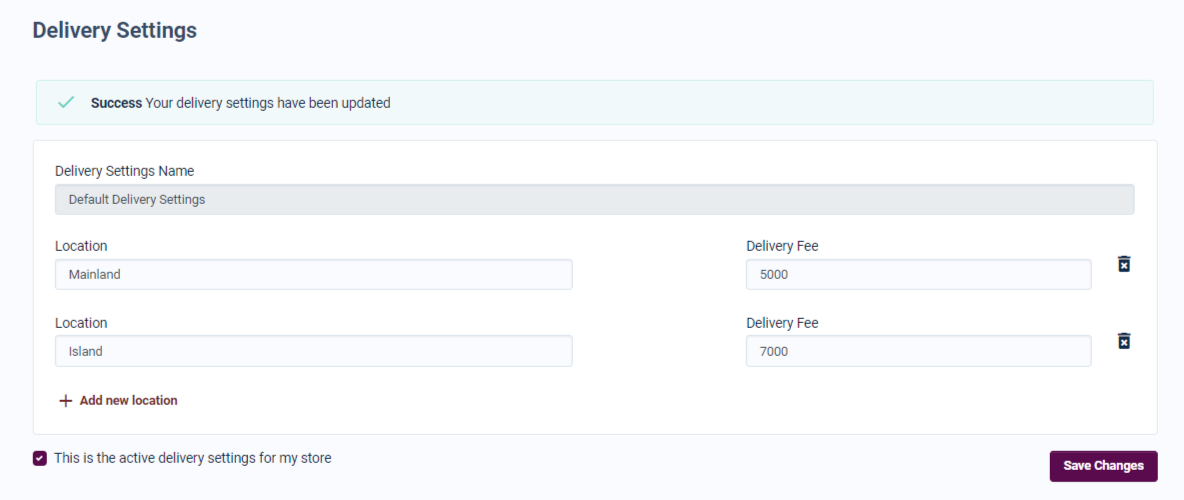
- Visit Delivery Settings: Go to the delivery settings page here.
- Add Locations: You can add as many locations as you like (states, cities, or landmarks) along with their delivery prices.
- Save Your Settings: After adding all locations, make sure to save your settings.
When customers want to purchase physical products from your store, they will see the available delivery locations.
Currency Information
Delivery prices will be in your default currency. If you set a product price in a foreign currency, the delivery price will be converted accordingly.
Let us know if you have any questions!